Cut Files - the Moon: A Multilayer Layout for Creative Projects
Whether you're a seasoned designer, an aspiring entrepreneur, or simply someone passionate about DIY crafts, Cut Files - the Moon offers a unique and versatile solution. This multilayer layout is designed to bring creativity and precision to your laser cutting, CNC routing, and other digital fabrication projects. With its layered structure, The Moon design adds depth and visual interest to any finished product, making it ideal for signage, home décor, gifts, and more.
What Are Cut Files - the Moon?
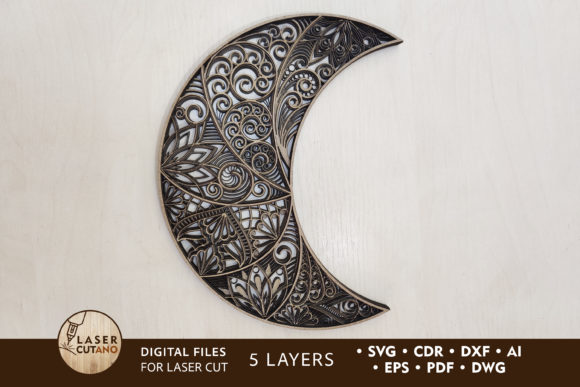
Cut Files - the Moon are high-quality digital files that come in multiple formats such as .AI, .SVG, .DXF, .DWG, .CDR, .EPS, and .PDF. These files are specially prepared for use with laser cutters, CNC routers, and similar machines. They feature a multilayer layout — typically five layers — allowing for intricate designs when materials like wood, acrylic, or metal are stacked and cut accordingly.
The standard size of the finished product is 9 x 12 inches, which is suitable for many applications. However, the beauty of these files lies in their scalability. You can easily increase the size to accommodate larger projects, but be cautious when reducing dimensions, especially if thin elements are involved.
Why People Choose The Moon Design
- Visual appeal: The layered effect creates a dynamic and artistic look that stands out from single-layered designs.
- Versatility: Works well with various materials including plywood, MDF, acrylic, cardboard, and even paper.
- Professional quality: Ideal for those who want to produce clean, accurate, and repeatable results without spending hours on design work.
- Ready-to-use: Comes in popular vector file formats, so no need to recreate or convert anything before using.
Common Mistakes When Using Cut Files - the Moon
Despite the benefits, there are several common pitfalls people encounter when working with The Moon multilayer layout. Avoiding these mistakes ensures not only better results but also saves time, material, and effort.
Misunderstanding File Formats
One of the most frequent errors is assuming all file formats are interchangeable. While .AI, .SVG, and .DXF are commonly used for laser cutting and CNC routing, each has specific strengths and limitations. For example, some machines may prefer .DXF for precise cuts while others support .SVG for scalable graphics. Always verify which format works best with your machine's software.
Ignoring Material Thickness Guidelines
The recommended material thickness for wood is between 3–6 mm (1/8in – 1/4in). Many users overlook this detail and attempt to use thicker or thinner materials than suggested. This can lead to issues such as incomplete cuts, warping, or misalignment of layers. If you're using a different material like acrylic or metal, ensure you adjust your machine settings and tooling accordingly.
Scaling Issues with Thin Elements
When resizing the design, particularly shrinking it, users often fail to consider how thin lines and small details will respond. If you reduce the scale too much, these delicate parts may become too fragile or disappear entirely during the cutting process. A good rule of thumb is to avoid scaling down below a certain threshold unless you’re confident in the machine’s precision and the material's tolerance.
Not Preparing the Zip File Properly
After purchasing, users receive a .zip file containing all the necessary layers in multiple formats. A common mistake is attempting to open the .zip directly without extracting its contents. To use the files efficiently, always unzip the folder first to access individual files. This helps prevent software crashes and ensures compatibility across different design platforms.
How to Use The Moon Cut Files Effectively
To make the most of your Cut Files - the Moon, follow these practical tips and avoid the above mistakes by planning ahead and testing your setup.
Step-by-Step Preparation
- Download and unzip the file after payment. Make sure you have a reliable zip extraction tool installed on your computer.
- Open the file in your preferred design software. If you're unsure which format to use, start with .SVG or .DXF for general compatibility.
- Review the number of layers included in the design. Since it’s a multilayer layout, ensure your machine supports nested or multi-layer cutting processes.
- Set up your material correctly. Choose a thickness within the recommended range and secure the material properly on the bed to prevent movement during cutting.
- Test the design at full scale before starting large production runs. This helps identify potential alignment or scaling issues early on.
Realistic Example: Custom Signage
Imagine you're creating a custom wall sign using The Moon design. You select 5mm thick birch plywood, align the layers in your CAM software, and set the correct power and speed settings for the laser cutter. After a test run, you notice one of the inner layers isn’t cutting cleanly due to a mismatch in focus. By adjusting the machine's focus height and re-testing, you avoid wasting additional material and achieve professional results.
Choosing the Right Tools and Software
Another overlooked aspect is ensuring your tools and software are compatible with the multilayer nature of the design. Not all programs handle nested layers the same way. Some may require manual separation of layers, while others can automate the process. Popular software like Adobe Illustrator, CorelDRAW, and Inkscape are excellent choices, but check your machine's documentation for supported file types and layer handling capabilities.
If you're new to laser cutting or CNC routing, invest time in learning how your machine interprets vector paths and layers. Many manufacturers offer tutorials or forums where users share insights and settings for common materials and designs like The Moon.
Material Recommendations
The Moon layout is optimized for materials such as:
- Plywood and MDF: Great for indoor signs and decorative panels. Ensure surfaces are smooth and dust-free before assembly.
- Acrylic and Plexiglas: Offers a modern and transparent finish. Be mindful of melting or charring if using a laser cutter.
- Metal: Requires a CO2 laser or plasma cutter. Check for burrs and polish edges for a refined look.
- Cardboard and Paper: Perfect for prototypes or lightweight displays. May require additional reinforcement for durability.
Practical Advice to Avoid Costly Errors
Here are a few key strategies to help you avoid mistakes and improve the usability of your project:
- Check file compatibility: Before downloading, confirm that your machine and software support the chosen file format.
- Test with scrap material: Always do a trial run with leftover pieces to spot issues with layer alignment or cutting accuracy.
- Adjust for scaling: If you plan to resize the design, do so carefully and consider the impact on thin elements and spacing between layers.
- Read user reviews: Look for feedback from others who’ve used the same files and materials. This can highlight potential challenges and solutions.
Better Approaches for Beginners
If you're just getting started with digital cutting, here’s a better approach than rushing into the project:
- Begin with a simple material like cardboard to understand how the layers fit together.
- Use a ruler or caliper to measure the thickness of your stock and compare it to the recommended specs.
- Export a single layer first to see how the machine handles the cut path before assembling all layers.
- Keep a backup of the original files in case you need to reset or troubleshoot later.
What to Check Before Finalizing Your Project
Before you commit to cutting, take a moment to review these important factors:
- Layer order: Confirm the sequence of layers matches the intended design. Misaligned layers can ruin the final look.
- Machine calibration: Ensure your machine is properly calibrated for the material you’re using. Poor calibration leads to inaccurate cuts.
- File integrity: Open each file type to verify that the layers and paths are intact and not corrupted during download.
- Design clarity: Zoom in on the file to inspect fine details. If they appear too small or broken, reconsider scaling or material choice.
Conclusion
Cut Files - the Moon is more than just a design — it's a creative foundation that allows you to explore the possibilities of layered artistry. By understanding the nuances of file formats, material recommendations, and scaling considerations, you can elevate your projects from ordinary to extraordinary. Take the time to prepare, test, and refine your approach. Doing so not only improves the quality of your output but also enhances your overall experience with digital cutting technologies.
With the right knowledge and preparation, you’ll be able to confidently incorporate The Moon design into your next project — whether it's a gift, a display piece, or a marketing tool. Remember, attention to detail and a proactive mindset are the keys to successful crafting and design execution.